DiscWright 2.0, a real Windows app
In September I wrote about DiscWright, a set of PowerShell scripts that turned a GOG installer into a disc that behaves like one from a box. I ended that post with a promise: any executable, and folders with no installer at all, were next.
They arrived with a lot more. DiscWright 2.0 came out on 11 November, and it is a proper Windows app now: one window, a setup or a portable exe, and winget install DiscWright.DiscWright.
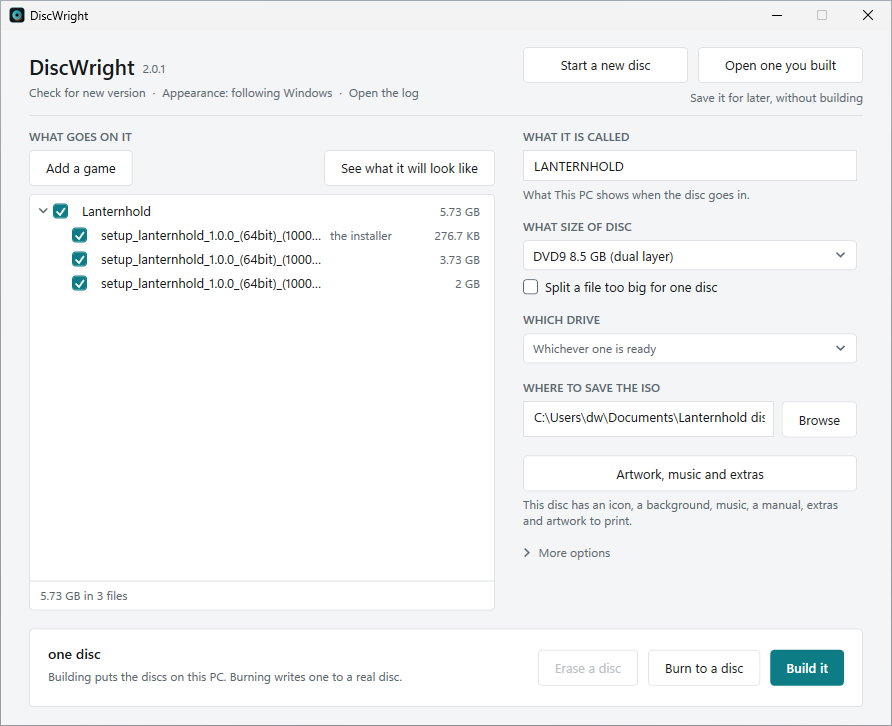
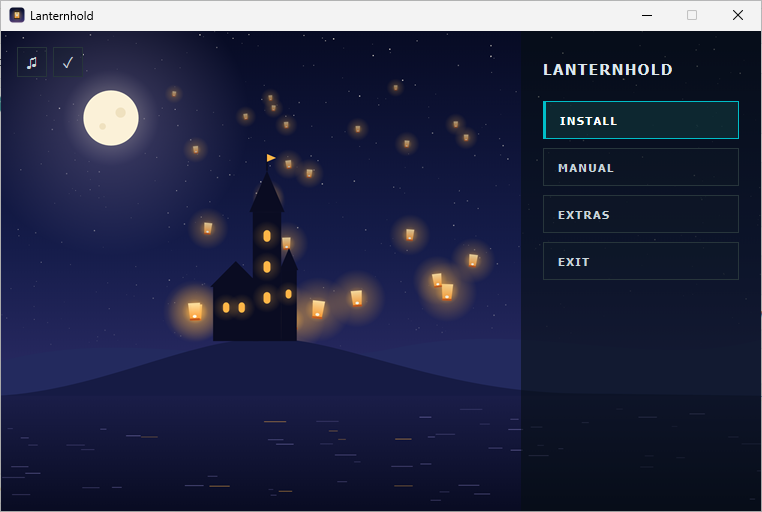
You add a game’s installer, from GOG or anywhere else, or just a folder of game files. DiscWright plans the disc, writes it, and then reads every file back to prove the disc came out right. The disc gets the game’s own icon and name in This PC, and a menu when it goes in, with Install, the manual, the extras and the game’s music playing over its picture.
A game too big for one disc becomes a numbered set, and that was the part I wanted most. Any disc of the set installs the whole game: its menu copies the disc, asks for the next one, carries on by itself when it goes in, puts the pieces of a split installer back together, checks them, and runs the installer from there. Exactly like the games that came on several CDs in the early 2000s, except it checks its work.
How it was made#
The PowerShell version was mine line by line. 2.0 is written in C#, which is not a language I work in, so I built it with Claude Code. I designed it and decided how every part should behave, and the code was written to that. My job was the part no compiler can do: knowing what a game disc should feel like, and proving it on real hardware.
So I burned a lot of discs. I recorded my screen and my voice while using it, and every time something felt wrong it became a fix. Behind the app there are 1,921 automated tests, and mutation testing, which plants faults in the code on purpose to see whether the tests notice, catches about 89% of them where the app makes its decisions.
The surprise was where the bugs came from. Almost none came from ordinary tests that check one example. Nearly all of them came from a test that presses the app’s buttons in random order and checks after every step that the window still adds up, from mutation testing, or from me sitting in front of a real drive.
The part I did not expect#
Rewritable discs wear out fast. A CD-RW that has been erased and written a few times in one evening starts failing to read back, and not consistently. One night a disc failed its check in one of my drives and read perfectly in the other, and Windows’ own event log showed bad blocks on the first drive during exactly those minutes. The app now reads a file twice before blaming it, and when only reading fails it says which drive could not read the disc, and that another one might.
A drive disappears for a moment after you close its tray. Burning a set across two discs, I pressed “The blank is in” for disc 2 and the app told me there was no disc writer on this machine, about the writer that had just written disc 1. For a second or two after the tray closes, Windows lists no drives at all. Now the app waits for it.
An old laptop is a different world. Installing my sets on a Windows 10 laptop found five things my desktop never showed: a window too tall for the screen, a progress bar that sat at 0% through a 4 GB file, a menu that froze for a moment when the next disc went in, minutes of silence after a burn, and a menu button that said “Starting” followed by three junk characters. That last one turned out to be the oldest bug of all: the same thing garbled any game name with an accent or a trademark sign in it. The disc’s menu is an HTA, and Windows reads it in an encoding from the nineties, so every character outside plain English came out as junk. All five are fixed in 2.0.2.
Where it is#
It is free and MIT licensed, for Windows 10 and 11, with a setup, a portable exe, and winget install DiscWright.DiscWright. It updates itself when you ask it to. It is not code signed yet, so Windows warns you the first time: More info, then Run anyway. It is also on its way to the Microsoft Store, which will take care of that.
The PowerShell version is still there for anybody who wants to read every line before running it, and a Linux version is on the roadmap.